Smoke Toolkit Extra: A Practical Asset Bundle for Real Creative Workflows
Smoke Toolkit Extra isn’t a standalone tool—it’s a precision-crafted asset bundle designed to integrate seamlessly into how professionals actually work. Whether you’re designing a social media ad, preparing a client presentation, building a brand mood board, or enhancing product photography, smoke elements add depth, motion, and atmospheric texture without requiring hours of manual compositing. This bundle delivers that capability in five distinct, production-ready formats—each selected not for novelty, but for compatibility, scalability, and immediate usability across common design tasks.
What You Get—and Why Format Matters
The value of Smoke Toolkit Extra lies in its intentional format diversity. It includes:
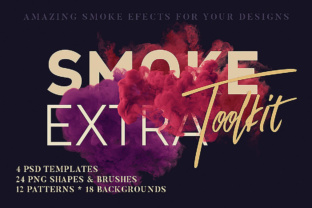
- 24 smoke shapes as transparent PNGs (≈2500px wide): ideal for quick masking, layering over typography, or isolating smoke as a focal element in posters or web banners;
- 24 smoke brushes in ABR format (≈2500px resolution): built for expressive, non-destructive painting directly in Photoshop—useful for blending edges, adding organic transitions, or hand-guided smoke trails;
- 12 smoke patterns in JPG-based PAT format (1000×1000px): perfect for filling shapes, creating seamless textures in UI overlays, or generating subtle background gradients in print layouts;
- 18 high-resolution smoke backgrounds (5184×1000px JPG): optimized for full-width digital displays—think website hero sections, email headers, or video thumbnail backdrops where horizontal stretch is needed without pixelation;
- 4 layered PSD templates (4500×3456px): fully editable scenes with organized layers, blend modes, and smart objects—designed as starting points for mockups, photo composites, or branded visual assets.
Each format serves a specific role in the creative pipeline. You don’t need all five for every project—but having them available means you can match the right asset type to the task at hand, rather than forcing one solution across incompatible contexts.
How It Fits Into Your Workflow—Before, During, and After
Smoke Toolkit Extra supports multiple phases of a project—not just the “final polish” stage. Here’s how it functions in practice:
Before Production: Planning and Prototyping
When sketching concepts or building early mockups, use the PSD templates as base files. Their layered structure lets you swap in your own images, adjust opacity, or toggle visibility to test composition options quickly. The smoke backgrounds also serve as neutral yet evocative placeholders during stakeholder reviews—communicating tone and hierarchy before final assets are ready.
During Execution: Iteration and Integration
Once content is locked in, the brushes and PNG shapes become time-saving tools. Need to soften the edge between a subject and background? Paint with a smoke brush instead of refining a mask manually. Want to emphasize motion in a flyer headline? Overlay a transparent smoke shape and apply a subtle drop shadow—no blending mode guesswork required. Because all PNGs are transparent and sized consistently (~2500px), they scale predictably across documents without distortion or quality loss.
After Delivery: Repurposing and Consistency
Long-term brand consistency benefits from reusable smoke assets. Save your most-used smoke patterns as custom fills in Photoshop for future projects. Store frequently applied brush strokes as actions. Even the JPG backgrounds—though flat—can be converted into adjustment layers with gradient masks to create dynamic light effects across multiple files. This reduces reliance on external stock sites and keeps visual language aligned across campaigns.
Compatibility That Works With Your Stack
Smoke Toolkit Extra avoids proprietary lock-in. PNG and JPG files open in virtually any image editor—Affinity Photo, GIMP, Canva, Figma (via import), or even PowerPoint for quick slide enhancements. The ABR brushes and PAT patterns require Adobe Photoshop (CS6 or newer), but their file structure follows industry standards—so they load reliably without plugin dependencies. Layered PSDs preserve groupings, layer styles, and transparency, making them safe to open in Affinity Photo or Photopea if needed (though some advanced features like layer comps won’t translate).
This cross-platform flexibility means you can begin work in one environment and finish in another—say, roughing out a layout in Figma using a smoke PNG, then refining details in Photoshop with the matching brush set. No re-exporting, no conversion friction.
Practical Tips for Smarter Use
Here’s what experienced designers do to get consistent results:
- Organize by use case, not format. Create folders labeled “Photo Composites,” “Typography Overlays,” or “Web Headers”—then place relevant PNGs, brushes, and PSDs inside. This mirrors how you think when starting a task, not how assets were delivered.
- Test brushes at varied opacities and flow settings. Many smoke brushes behave differently at 15% vs. 70% opacity. Spend 5 minutes adjusting settings on a test document—you’ll discover which ones work best for soft diffusion versus sharp directional smoke.
- Resize patterns before applying. While the 1000×1000px PAT files tile cleanly, scaling them up beyond 200% in large documents may reveal subtle repetition. For massive prints or billboards, duplicate and offset pattern layers slightly to break visual rhythm naturally.
- Use backgrounds as luminance guides. Load a smoke background into a new layer above your main image, set blend mode to “Overlay” or “Soft Light” at 20–30% opacity, and use it to identify contrast gaps or highlight areas needing emphasis.
Quality Control and Long-Term Usability
All assets are delivered at resolutions that balance fidelity and file size. The 2500px smoke shapes and brushes retain clarity even when scaled down for mobile thumbnails or up for large-format prints. The 5184×1000px backgrounds support ultra-wide displays without tiling artifacts. And because each item is individually named and grouped logically (e.g., “smoke-shape-07.png”, “smoke-brush-19.abr”), version control and team sharing remain straightforward—even in cloud-based workflows like Dropbox or Google Drive.
There’s no subscription or activation step. Once downloaded, the files live locally and perform identically whether you’re offline editing a presentation or collaborating remotely via shared libraries. That reliability makes Smoke Toolkit Extra useful not just for one-off projects, but as part of an ongoing creative infrastructure—something you reach for repeatedly, not just once.
Who Benefits Most—and How
Freelancers use the PSD templates to deliver polished mockups faster—reducing revision cycles with clients who respond well to atmospheric visuals. Marketers layer smoke backgrounds behind text in email campaigns to increase visual retention without sacrificing readability. Educators embed smoke PNGs into lecture slides to guide attention toward key concepts. Small business owners apply smoke brushes to product photos to add premium texture before uploading to Shopify or Etsy. Even bloggers use the patterns as subtle dividers between article sections—creating visual rhythm without distracting from content.
None of these uses require mastering smoke simulation physics or spending hours in 3D software. Smoke Toolkit Extra bridges the gap between intention and execution—giving you professional-grade atmospheric elements that behave predictably, integrate smoothly, and support real-world deadlines.