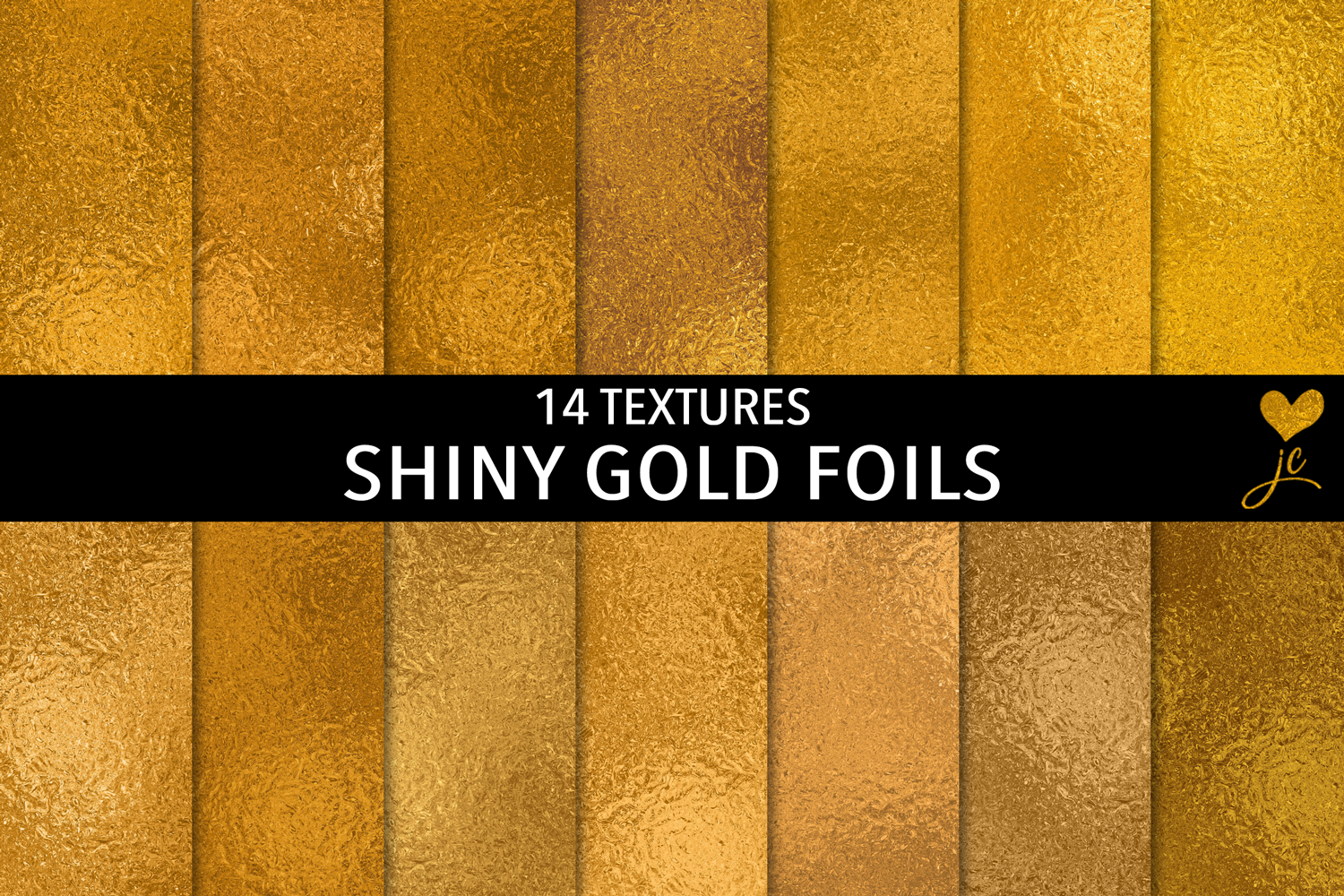
Shiny Gold Foils: A Practical Guide for Designers Seeking Premium Metallic Texture
Shiny Gold Foils is a curated digital resource designed to bring authentic, luminous gold texture into design workflows—without physical materials, specialty printers, or complex setup. At its core, it’s a set of 14 high-resolution, seamless JPEG textures and 14 matching Photoshop pattern files (.PAT), all built from real-world gold foil aesthetics across varied tones: warm antique gold, bright champagne, deep rose gold, and cool metallic gold. Each image measures 3000 × 3000 pixels at 300 dpi—equivalent to 10 × 10 inches (25.4 × 25.4 cm)—making them suitable for both print and high-fidelity screen use.
What Sets Shiny Gold Foils Apart from Generic Metallic Textures
Not all gold textures deliver the same visual weight or technical reliability. Many free or low-cost gold overlays suffer from visible tiling seams, inconsistent lighting direction, or oversaturated color that doesn’t translate well under different lighting conditions—or when layered with type or photography. Shiny Gold Foils addresses these issues directly: every JPEG is tested for true seamlessness, meaning it repeats cleanly in any direction without ghosting or edge artifacts. The textures were captured and refined to preserve subtle highlights, micro-reflective grain, and natural tonal variation—key qualities that separate realistic foil simulation from flat, synthetic gradients.
The inclusion of native Photoshop patterns (.PAT) adds another layer of practicality. Unlike applying a JPEG as a layer and manually scaling or masking, PAT files integrate directly into Photoshop’s Fill dialog, allowing instant, scalable, non-destructive application across shapes, text layers (via layer styles), or entire backgrounds. This saves time during iterative design phases where experimentation with scale, opacity, or blending modes is common.
How It Compares to Other Gold Texture Options
Designers evaluating options typically encounter three broad categories: free online resources, subscription-based texture libraries, and premium standalone packs like Shiny Gold Foils. Free textures often come with usage restrictions, inconsistent resolution, or embedded watermarks—and rarely include pattern files. Subscription services offer breadth but may lack cohesion: gold textures might be scattered across unrelated categories, vary in DPI or tile behavior, and require ongoing access to use. In contrast, Shiny Gold Foils provides a focused, self-contained collection with uniform specs and immediate download access—no login, no renewal, no licensing ambiguity for personal or commercial projects.
Compared to custom foil photography or scanning physical swatches, Shiny Gold Foils trades absolute uniqueness for consistency and speed. A designer needing one specific tone for a brand guideline can select from 14 calibrated variants—each named and previewed—rather than spending hours adjusting hue/saturation on a single source image. However, if a project demands bespoke foil behavior (e.g., simulating embossed letterpress with directional light falloff), a custom photo shoot or 3D render remains the more precise option—though significantly more time- and cost-intensive.
Practical Use Cases and Where It Fits Best
Shiny Gold Foils excels in contexts where visual polish matters but production constraints limit physical execution. Wedding stationery designers use the textures for save-the-date cards or invitation borders—scaling seamlessly across A6 to A4 formats without pixelation. Social media managers apply them as subtle background overlays for branded quote graphics, leveraging blend modes like Overlay or Soft Light to retain readability while adding richness. Packaging mockup artists drop them into Smart Objects to simulate foil-stamped labels on bottles or boxes, avoiding the need for expensive prepress proofs.
Because all files are raster-based JPEGs and PATs—not vector or procedural—Shiny Gold Foils works reliably across Adobe Creative Cloud (Photoshop, Illustrator via paste-as-smart-object, InDesign), Affinity Photo, and even Figma (when imported as images). It does not support dynamic recoloring like SVG filters or CSS gradients, nor does it adapt automatically to dark mode—so designers working in fully responsive web environments may need complementary solutions for adaptive contrast.
Tradeoffs to Consider Before Choosing
While versatile, Shiny Gold Foils has clear boundaries. It contains no editable vector elements, no animated variants, and no alternate finishes (e.g., matte gold, brushed gold, or holographic shifts). If a project requires multiple metallic effects within one layout—or needs to shift between gold, silver, and copper cohesively—the pack’s singular focus becomes a limitation rather than a strength. Similarly, because textures are fixed-resolution raster files, extreme upscaling beyond 3000 × 3000 px (e.g., for billboard-sized prints) may reveal interpolation softness unless resampled carefully.
Another consideration is workflow integration. Designers who rely heavily on non-Adobe tools—like Canva, Gravit Designer, or open-source suites—won’t benefit from the PAT files, though the JPEGs remain usable. In those cases, the value shifts entirely to the quality and seamlessness of the base images—not the added convenience of native pattern support.
When Shiny Gold Foils Is Likely the Right Choice
This collection fits best for professionals and serious hobbyists who:
- Need predictable, production-ready gold textures for both print and digital output;
- Work primarily in Photoshop and want to streamline repetitive foil applications;
- Prefer one-time purchase over recurring subscriptions;
- Value consistency across a set—same resolution, same tiling behavior, same color integrity;
- Are building templates, branding kits, or themed design systems where cohesive metallic tone matters.
It’s especially useful when time is constrained: launching an e-commerce banner series, preparing a client pitch deck, or finishing a boutique product label—all within a single afternoon.
When You Might Look Elsewhere
Consider alternatives if your work involves:
- Dynamic or interactive media: Websites requiring CSS-based metallic effects, variable color schemes, or dark/light mode adaptation will need code-driven solutions—not static textures.
- Vector-dominant workflows: Logos, icons, or scalable illustrations benefit more from metallic gradient meshes or SVG filters than raster overlays.
- Highly specialized finishes: Simulating aged patina, cracked foil, or foil-on-foil layering usually requires custom compositing beyond what pre-made textures provide.
- Budget-first exploration: If you’re testing whether gold textures add value to your style before committing, free or trial-based libraries may be lower-risk starting points—even if less consistent.
Making a Confident Decision
Shiny Gold Foils isn’t about replacing technique—it’s about removing friction where technique is already sound. Its strength lies in reliability: knowing that a texture will tile without seams, match across formats, and hold up under professional output standards. That predictability supports faster iteration, clearer client presentations, and fewer last-minute adjustments before final handoff.
As with any design asset, the real test isn’t just resolution or format—it’s how easily it integrates into your existing process and whether it expands what you can deliver—not just what looks impressive in isolation. For designers balancing quality, efficiency, and control, Shiny Gold Foils offers a focused, well-executed solution where gold texture is a functional element, not just decoration.