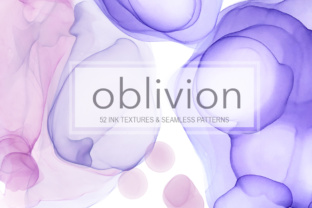
Oblivion Ink Texture Collection
If you're a designer, illustrator, or digital creator looking to infuse authenticity, depth, and tactile nuance into your work—without the time-consuming process of hand-painting each texture—you’ll appreciate what the Oblivion Ink Texture Collection offers. It’s not just another set of digital brushes or stock patterns. It’s a thoughtfully curated library of abstract ink textures and seamless patterns, all drawn by hand, then meticulously digitized to preserve their organic character while ensuring maximum versatility.
Many creators face recurring challenges: flat-looking designs, repetitive visuals, or the struggle to achieve genuine texture in digital workflows. Others need adaptable assets that perform equally well on light interfaces, dark-mode UIs, editorial layouts, or print-ready projects—without extra editing or color correction. The Oblivion Ink Texture Collection directly addresses these needs by delivering textures that behave like real ink on paper—yet adapt intelligently to any background color, whether white, charcoal, or gradient.
What makes this collection especially practical is its dual-format delivery: every item comes in both JPG and transparent PNG. That means no guesswork about compatibility. Whether you’re working in Adobe Photoshop, Illustrator, Affinity Designer, Figma (with PNG imports), Procreate, or even Canva, the files integrate smoothly. And because transparency is preserved, layering, masking, blending modes, and non-destructive experimentation become second nature—not technical hurdles.
The collection includes two core categories, each serving distinct creative goals:
- 37 hand-drawn ink shapes — ranging from delicate splatters and expressive blots to bold gestural strokes and intricate organic forms. Sizes vary widely (2100–6100 pixels wide), giving you flexibility for everything from subtle accents in web design to dominant visual elements in large-format prints.
- 15 seamless ink patterns — all rendered at 4000×4000 pixels and 300 DPI, ideal for high-resolution applications like packaging, textile mockups, branding backdrops, or editorial spreads. Each pattern repeats flawlessly, with no visible seams—even when scaled or tiled across expansive surfaces.
Unlike algorithmically generated textures, every element in the Oblivion Ink Texture Collection carries the subtle irregularities and tonal variation of real ink—capillary bleed, feathered edges, pigment pooling, and natural drying gradients. That authenticity translates into immediate visual credibility. When applied to a logo overlay, a poster background, or a UI card, it doesn’t look “added”—it feels like part of the original composition.
Here’s how different users can put it to work:
- Branding & Identity Designers use the seamless patterns as subtle background textures behind letterforms or within brand guidelines—adding sophistication without distracting from messaging. A soft ink wash beneath a minimalist logotype, for example, introduces warmth and human touch without compromising clarity.
- Web & UI/UX Designers leverage the transparent PNG shapes to create custom dividers, hover effects, or section transitions. Because they render cleanly on both light and dark modes, one asset can serve dual themes—reducing file bloat and simplifying handoff to developers.
- Print & Packaging Professionals rely on the 300 DPI resolution and CMYK-friendly contrast range. The ink patterns scale beautifully on labels, boxes, or stationery, while individual shapes can be used as foil-stamped accents or embossed-inspired graphic motifs.
- Illustrators & Digital Artists treat the collection as a hybrid toolkit: combine multiple ink shapes using blend modes (Multiply, Overlay, Soft Light) to build layered compositions; use patterns as underlays for hand-drawn sketches; or extract details from larger shapes to create custom brush tips or clipping masks.
One of the most powerful—and often overlooked—benefits is compositional freedom. Since all shapes and patterns are delivered as discrete, high-res files, there’s no lock-in to preset arrangements. You’re not limited to using a texture “as-is.” Instead, you can rotate, flip, recolor (via layer blending or adjustment layers), crop, mask, or stack them intuitively. Want to build a custom border from three different ink strokes? Done. Need a distressed header using a seamless pattern overlaid with a large-scale blot? Easily achievable. The Oblivion Ink Texture Collection gives you raw, expressive material—not finished templates.
For best results, consider these practical recommendations:
- Start with purpose, not aesthetics. Ask: Is this texture supporting hierarchy? Evoking mood? Solving a legibility issue? Let function guide selection—not just visual appeal.
- Test early on final backgrounds. Even though the textures are optimized for both light and dark use, preview them at actual size and context—especially for UI or responsive layouts where scaling affects perceived density.
- Use opacity and blend modes deliberately. A 15% opacity Multiply layer of an ink shape adds nuance; the same shape at 100% Overlay delivers dramatic contrast. Experiment before settling.
- Combine with typography mindfully. Ink textures enhance—but shouldn’t compete with—text. Reserve heavier shapes for headlines or pull quotes; use finer patterns or low-opacity overlays for body text containers.
It’s also worth noting how the Oblivion Ink Texture Collection fits into broader creative trends. As audiences grow more sensitive to overly polished, AI-homogenized visuals, hand-crafted texture is becoming a quiet differentiator—signaling intentionality, care, and human authorship. This collection supports that shift without requiring new skills or hardware. You don’t need to learn calligraphy or buy specialty pens. You get the expressive result—immediately, reliably, and professionally.
Finally, accessibility matters. Because the ink elements retain strong edge definition and sufficient contrast across backgrounds, they support readability when used alongside text—especially compared to low-contrast noise textures or overly diffuse grunge overlays. That makes the Oblivion Ink Texture Collection not only beautiful but responsible in application.
In short, the Oblivion Ink Texture Collection is more than a download—it’s a flexible, future-proof resource for designers who value authenticity, efficiency, and expressive control. Whether you’re refining a client presentation, elevating a personal portfolio, or building a scalable design system, these textures offer consistent quality, intuitive usability, and room to grow with your evolving style. They don’t replace your voice—they amplify it.