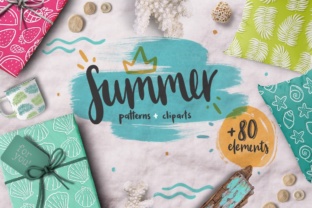
Summer Lover Kit 80 Elements: A Practical Design Resource for Real Creative Workflows
When seasonal energy shifts—especially into summer—creative professionals don’t just need inspiration; they need reliable, production-ready assets that integrate cleanly into existing tools and timelines. The Summer Lover Kit 80 Elements fills that gap precisely: a curated, handcrafted collection of tropical-themed design elements built for speed, flexibility, and visual authenticity—not just aesthetic novelty.
This isn’t a decorative add-on you browse once and forget. It’s a working toolkit. Every element was drawn by hand, then digitized with attention to layer integrity, transparency, and format versatility. That means it behaves predictably inside your established workflow—whether you’re designing Instagram carousels at 7 a.m., prepping merch mockups for a small-batch clothing launch, or building an educator’s summer-themed lesson deck.
How It Fits Before the Project Starts
Preparation matters most when time is tight—and summer projects often are. You might be finalizing a beach resort’s social media calendar in late May, or prototyping swimwear labels for a June pop-up. In those cases, having the Summer Lover Kit 80 Elements already organized in your asset library cuts setup time significantly.
Before opening Illustrator or Photoshop, take five minutes to extract the ZIP and sort files by use case: keep the .PNG outline cliparts in a “Line Art” folder, the .JPEG patterns in “Backgrounds,” and the .PSD watercolor elements in “Textures.” This small act prevents mid-project hunting and supports consistent output—especially if multiple team members access shared drives or cloud storage.
Because the kit includes both color and outline versions, you can also pre-define brand-aligned palettes. For example, swap the default coral and turquoise in the .AI pattern files using Global Colors in Illustrator—then save those as branded variants. That way, every new layout pulls from your approved scheme without manual recoloring each time.
During Execution: Where Format Choice Drives Efficiency
The real value of the Summer Lover Kit 80 Elements reveals itself during active design work—not in theory, but in execution decisions:
- Need clean scalability? Use the .AI or .EPS vector files for logos, packaging, or large-format prints. They resize infinitely without quality loss, and anchor points remain editable for subtle tweaks—like adjusting leaf curvature on a pineapple icon to match your typography’s rhythm.
- Building layered digital composites? The .PSD files include transparent layers and blend modes preserved. Drop them into a mockup, adjust opacity or overlay settings, and retain full control—no flattening required.
- Exporting for web or email? Rely on the .PNG outline elements for crisp, lightweight icons in newsletters or landing pages. Their transparent backgrounds eliminate extra masking steps.
- Creating repeatable surface designs? The 20 included .JPEG patterns tile seamlessly. Import one into Photoshop, define it as a pattern overlay, and apply it across multiple layers—ideal for textile previews or branded slide templates.
Notice how each format serves a specific stage of output—not just a generic “design need.” That precision reduces backtracking. You’re not converting files mid-process or compromising resolution because the right version wasn’t ready.
After Delivery: Extending Value Beyond the First Use
A well-structured kit like the Summer Lover Kit 80 Elements pays dividends long after the initial project ships. Its 80 elements aren’t isolated graphics—they’re modular components. A single watercolor sunburst (included as a .PNG) can become a background texture, a framing device for testimonials, or a subtle watermark on downloadable resources.
For educators and content creators, this modularity supports consistency across platforms. Use the same palm frond motif—from the .AI line art set—in your Canva course slides, your Substack header, and your printable summer reading checklist. Visual continuity builds recognition without requiring custom illustration for each channel.
Small business owners benefit similarly. If you run a boutique selling handmade candles, pull the tropical fruit illustrations to label scents (“Mango Coconut,” “Pineapple Sage”)—then reuse the same vector outlines in your Shopify product badges and Instagram Story highlights. That cohesion strengthens perceived professionalism, especially when resources are lean.
Compatibility and Integration Notes
The Summer Lover Kit 80 Elements works without friction in widely used environments:
- Adobe Creative Cloud users get full fidelity: open .AI files directly in Illustrator, edit layers in .PSD, and place .EPS into InDesign layouts with live linking.
- Canva users can import the .PNG and .JPEG files directly. While Canva doesn’t support .AI, the high-res .PNG outlines retain sharp edges even at larger sizes—making them viable for social banners or print-on-demand previews.
- Figma or Affinity users benefit from the .PNG and .JPEG assets. For vector editing, open the .EPS or .AI files in Illustrator first, then export as SVG if needed.
No plugin, license key, or subscription unlocks functionality. What you download is what you use—immediately, offline, and without dependency on third-party services.
Practical Tips for Long-Term Usability
To ensure the Summer Lover Kit 80 Elements stays useful across seasons and projects:
- Tag intelligently. In Adobe Bridge or your OS file browser, add metadata tags like “tropical,” “hand-drawn,” “summer,” and “vector” to each file type. That makes future searches faster than scrolling through folders.
- Batch rename for clarity. Instead of “element_47.ai,” rename to “tropical-palm-frond-outline.ai.” Consistent naming prevents misapplication—e.g., using a watercolor element where a crisp vector is required.
- Test print early. If producing physical goods, run a test print of one .JPEG pattern and one .AI vector at actual size. Confirm color accuracy, bleed handling, and resolution before committing to bulk runs.
- Archive variants. Save edited versions (e.g., recolored patterns or resized icons) in a separate “Edited Assets” folder—not inside the original ZIP. That preserves source integrity for future updates or rework.
Finally, consider how this kit complements—not replaces—your broader creative stack. Pair it with free Google Fonts like Cabin Sketch or Quicksand for cohesive typography. Use it alongside royalty-free summer audio loops (for video edits) or ambient light photography (for mood boards). The Summer Lover Kit 80 Elements excels when treated as one dependable node in a larger, intentional system—not as a standalone solution.
That’s where its durability lies: not in trendiness, but in utility. It gives you 80 starting points—not 80 finished ideas. And in real-world creative work, the difference between those two things is the difference between shipping on time and scrambling at midnight.