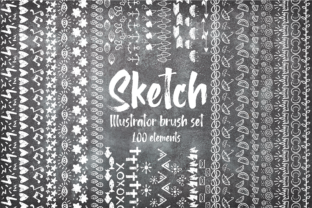
Sketch Illustrator Brush Set Bundle 100 Elements
The Sketch Illustrator Brush Set Bundle 100 Elements is a curated collection of 100 Adobe Illustrator brushes—50 regular vector brushes and 50 texture-based brushes—distributed as a downloadable .zip file. These brushes are designed with a hand-drawn, doodle-style aesthetic: think organic lines, subtle imperfections, and expressive strokes. They are seamless, meaning they tile smoothly when repeated, making them suitable for patterns, borders, frames, underlines, and decorative circular motifs.
This bundle targets designers who want to introduce an authentic, handmade quality into digital work without building assets from scratch. It is not a plugin or extension, nor does it include Photoshop brushes, Procreate files, or SVGs—only native Illustrator (.ai) brush formats compatible with recent versions of Adobe Illustrator (CS6 through CC 2024).
Why Designers Consider This Bundle
Designers often seek tools that reduce repetitive tasks while preserving visual warmth. Digital interfaces, branding materials, and print layouts can sometimes feel overly polished or sterile. The Sketch Illustrator Brush Set Bundle 100 Elements offers a practical path to reintroduce tactility and personality—especially in projects where craft-inspired aesthetics align with brand voice or audience expectations.
Common use cases include:
- Creating custom borders or corner flourishes for invitations, certificates, or editorial layouts
- Building seamless pattern swatches for packaging, stationery, or web backgrounds
- Adding expressive underlines or dividers in presentations or social media graphics
- Enhancing typography treatments with hand-sketched embellishments
- Developing consistent illustration styles across a product suite without redrawing similar elements
Practical Benefits and Realistic Expectations
One clear benefit is time efficiency. Once installed, the brushes behave like native Illustrator tools: users can adjust stroke weight, color, opacity, and blending modes just as they would with any other brush. Because the set includes both clean line-based brushes and grainy texture variants, designers gain flexibility—using one type for structure and another for surface interest.
However, expectations should be grounded. These are static brush definitions—not generative AI tools or parametric shapes. Each brush produces a fixed visual outcome based on path direction, pressure (if using a tablet), and Illustrator’s brush settings. There is no built-in variation engine; diversity comes from selecting different brushes or layering them intentionally.
Also note: “seamless” refers to tiling behavior—not universal compatibility. Some texture brushes may require careful scaling to avoid visible repetition at large sizes. Users working on high-resolution print projects should test output at final dimensions before committing to production.
When This Bundle Fits Well
The Sketch Illustrator Brush Set Bundle 100 Elements is a strong fit for designers who:
- Work regularly in Adobe Illustrator and prefer native, non-destructive workflows
- Need repeatable, scalable hand-drawn elements—not raster scans or PNG overlays
- Value consistency across multiple projects (e.g., a studio maintaining a cohesive client portfolio)
- Have intermediate familiarity with Illustrator’s brush library, appearance panel, and graphic styles
- Seek cost-effective asset expansion without licensing complexity (the bundle typically includes a standard commercial license for end products)
It also suits educators and students exploring vector-based expressive mark-making, since the brushes demonstrate how texture and gesture translate into editable paths—not just bitmap approximations.
When Alternatives May Be More Appropriate
This bundle is less ideal in several scenarios. For example:
- Users outside the Adobe ecosystem: If your primary tool is Affinity Designer, Figma, or CorelDRAW, these .ai brushes won’t load natively. While some third-party converters exist, results vary—and you lose editability and fidelity.
- Projects requiring precise control over every anchor point: Since brushes generate paths algorithmically, fine-tuning individual segments post-stroke may require expanding the appearance and manually editing paths—a step that adds time.
- Brands needing strict visual governance: While versatile, the doodle style is inherently informal. It may clash with sectors where authority, precision, or minimalism are core values—such as financial dashboards, medical UIs, or corporate legal documents.
- Teams needing collaborative asset management: Unlike cloud-synced libraries (e.g., Adobe Libraries or shared Figma assets), this bundle requires manual installation on each machine and version tracking if updates occur.
Making an Informed Decision
Before acquiring the Sketch Illustrator Brush Set Bundle 100 Elements, consider three questions:
- What’s my primary design environment? Confirm Illustrator is your main vector tool—and that your version supports the brush format used (most bundles target CS6+).
- What proportion of my current work benefits from sketch-like expressiveness? Review recent projects: if fewer than 20% involve illustrative or artisanal styling, investing in specialized brushes may yield limited ROI.
- Do I need scalability and editability—or is stylistic variety more critical? This bundle delivers both, but not infinitely. Compare sample previews (if available) against your typical canvas size and output medium. A brush that reads well at 12 pt may blur or pixelate when scaled to billboard size—unless confirmed vector-native.
Also review licensing terms carefully. Most vendors permit use in client deliverables, but restrictions may apply to resale of the brushes themselves or creation of derivative brush sets. If your work involves template marketplaces or white-label design systems, verify redistribution rights upfront.
Final Considerations
The Sketch Illustrator Brush Set Bundle 100 Elements fills a specific niche: bridging the gap between digital precision and analog charm within Illustrator’s framework. It does not replace illustration skills, nor does it automate creativity—but it does lower the barrier to integrating intentional, human-centered texture into vector-based design.
Its value emerges most clearly when aligned with workflow habits and aesthetic goals—not as a standalone solution, but as a targeted enhancement. For designers already using Illustrator to develop branding, editorial, or product-facing visuals where warmth and approachability matter, this bundle offers tangible utility. For others, evaluating free or open-source sketch-style brush alternatives first may help gauge whether the investment matches actual usage patterns.
Ultimately, the decision hinges less on the number of brushes (100) and more on how consistently those 100 support the kinds of outcomes you’re regularly asked to produce.