Funny UFO: Hand-Drawn Space Graphics for Real Projects
If you’ve ever spent 20 minutes searching for a lighthearted, scalable spaceship icon—only to find overdesigned, generic assets or low-res PNGs that pixelate on a banner—you’ll appreciate what Funny UFO solves. This isn’t another clip-art pack. It’s a thoughtfully assembled collection of hand-drawn vector space elements designed for people who need expressive, professional-grade graphics without the creative overhead.
Why “Hand-Drawn” Matters More Than You Think
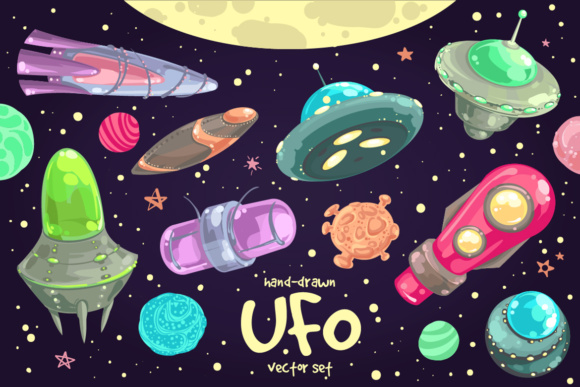
Most space-themed design assets lean heavily into photorealism or ultra-minimal tech aesthetics—both useful, but limiting when your goal is warmth, approachability, or narrative charm. Funny UFO stands out because every one of its 15 spaceships and planets carries subtle imperfections: uneven curves, gentle wobbles in planetary rings, asymmetrical cockpit windows. These aren’t flaws—they’re intentional cues that signal friendliness and human authorship. That makes them ideal for educational materials, children’s app interfaces, startup pitch decks explaining complex ideas simply, or internal comms where tone matters as much as clarity.
Because they’re built as vectors (AI CS3 and EPS 10), you can scale a tiny UFO from a newsletter header all the way up to a 6-foot trade show backdrop—no loss of fidelity. And unlike raster-only packs, there’s no guesswork about resolution limits or font compatibility. You’re not just getting files—you’re getting flexibility baked into the format.
What You Actually Get—and How Each Piece Fits Real Workflows
The package delivers exactly what’s needed for execution—not just inspiration:
- 1 AI CS3 file with all 23 vector elements (15 ships/planets + 8 stars) grouped logically—ideal for designers using Adobe Illustrator who want to edit layers, recolor on-the-fly, or isolate components for custom compositions.
- 1 EPS 10 file with the full set plus a JPEG preview—useful for cross-software compatibility (CorelDRAW, Affinity Designer) or quick client reviews where vector fidelity must be preserved but recipients don’t have Illustrator.
- 23 individual PNGs on transparent background—ready for immediate use in PowerPoint, Canva, Figma, or email templates. No clipping masks required. Drop them in, resize, and go.
- 6 seamless patterns (in EPS 10, high-res JPEG, and as separate files)—not filler textures, but cohesive, repeatable backdrops themed around cosmic dust, starfields, nebula gradients, and playful grid-based constellations. Perfect for website section dividers, slide backgrounds, or printable workshop handouts.
Notice there’s no PSD, no Sketch file, no “bonus fonts” or unrelated extras. Every included asset serves a defined purpose—and every format reflects real-world software constraints professionals face daily.
Who Benefits Most—and Why Timing Matters
Funny UFO shines brightest for creators balancing speed, brand voice, and visual consistency. Consider these scenarios:
- Educators building STEM lesson slides—A hand-drawn Saturn with visible ring texture helps students focus on orbital mechanics, not glossy realism. The transparent PNGs drop cleanly into Google Slides; the vectors let you annotate directly in Illustrator before exporting.
- Small business owners designing limited-run merchandise—That quirky flying saucer with three uneven legs? It prints crisply on tote bags at any size. No need to hire an illustrator for a single motif.
- Bloggers and newsletter writers illustrating abstract concepts—Need to visualize “out-of-this-world growth” or “launching a new idea”? A whimsical UFO hovering above a simple bar chart adds personality without distracting from data.
- Freelancers pitching to playful or mission-driven clients—Using Funny UFO elements in a proposal deck signals creativity and attention to tone—especially valuable when working with edtech startups, eco-brands, or nonprofit campaigns.
It’s less about “space” as a subject and more about leveraging expressive, non-corporate visuals to humanize communication—wherever clarity and connection are priorities.
When to Reach for Funny UFO—And When to Look Elsewhere
This set excels when you need characterful, editable, production-ready space graphics—not photorealistic renders, not sci-fi weapon schematics, not animated sprites. If your project calls for NASA-grade accuracy or cinematic lighting, Funny UFO isn’t the fit. Likewise, if you’re building a full game UI or need hundreds of icon variants, a broader icon system may serve better.
But if you’re updating a company intranet with illustrated process diagrams, designing a conference “innovation zone” backdrop, or creating social media assets for a science podcast—all while juggling tight deadlines—Funny UFO removes friction. There’s no learning curve to stylized vector editing, no licensing ambiguity (all assets are yours to use commercially), and no hunting across five folders for the right file type.
Patterns That Do More Than Fill Space
The six included seamless patterns deserve special mention—not as afterthoughts, but as functional design accelerators. One mimics a soft chalk-drawn starfield, perfect for educational worksheets. Another uses rhythmic, off-kilter star clusters ideal for modern SaaS landing pages wanting subtle depth without visual noise. Because each pattern is delivered in EPS 10 *and* high-res JPEG (300 dpi), you can use them for both digital screens and print collateral—brochures, posters, even fabric mockups—without re-exporting or resampling.
They’re designed to sit quietly behind content, not compete with it. That’s rare in pattern libraries, where complexity often overshadows utility.
A Practical Note on File Management
All files are logically named and organized—not buried in nested folders or obscured by version numbers. The AI CS3 file groups elements by type (spaceships, planets, stars), with layers labeled clearly. PNGs follow the same naming logic (ufo_07_transparent.png, planet_ringed_blue.png), so finding what you need takes seconds, not minutes. For teams using shared drives or design systems, that consistency reduces onboarding time and version confusion.
No tutorials are included—but none are needed. If you’ve used Illustrator or inserted PNGs into presentations before, you’re ready. The value isn’t in novelty—it’s in reliability.
Final Thought: Tools Should Serve Ideas, Not Block Them
Great design resources don’t shout. They stay out of the way—until you need them. Funny UFO works like that. It doesn’t replace your judgment or vision. Instead, it gives you expressive, technically sound pieces you can adapt, combine, and deploy with confidence—whether you’re sketching wireframes at midnight or prepping a client presentation before lunch. The hand-drawn quality invites interpretation; the vector precision ensures professionalism. And in the space between those two qualities—that’s where real communication happens.