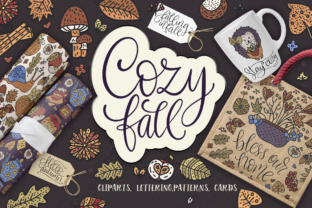
The Cozy Fall - Big Design Collection
There’s a reason so many creators—bloggers designing seasonal templates, small business owners launching fall product lines, educators crafting classroom decor, or hobbyists printing cozy greeting cards—reach for The Cozy Fall - Big Design Collection. It’s not just another autumn-themed pack. It’s a thoughtfully built, hand-painted resource with 68 color cliparts, 68 outline versions, 20 lettering pieces, 5 ready-made cards, and 10 seamless patterns—all delivered in multiple formats (EPS8, JPG, PNG with transparent backgrounds) and carefully scaled for real-world use.
But here’s what often gets missed: the difference between *owning* this collection and *using it well*. Many download it excitedly, open the ZIP, and dive straight into a project—only to hit friction later: mismatched resolutions, missing outlines when scaling, lettering that doesn’t align with their brand palette, or patterns that tile awkwardly on mugs or fabric prints. These aren’t flaws in the collection—they’re gaps in how it’s prepared for *your specific need*.
Assuming “All Files Are Ready to Drop In” Is the First Misstep
Yes, The Cozy Fall - Big Design Collection includes EPS8 files—which means vector scalability—but only if your software fully supports EPS8 (not all free or older design tools do). If you’re using Canva, Google Slides, or basic photo editors, opening an EPS8 file won’t work as expected. You’ll get a blank preview or an embedded raster image instead of editable paths.
Better approach: Start with the PNG or JPG files *only* if you need quick placement—and always check the resolution. The seamless patterns are delivered at 4167px × 4167px, which is excellent for large-format prints (like posters or wall decals), but overkill for Instagram stories or email headers. Resizing down without resampling can cause blurriness. Instead, open the PNG in Photoshop or Affinity Photo, use “Bicubic Sharper” when scaling, and save a new optimized version for web use.
Overlooking the Power of Outline Cliparts
Many users default to the color cliparts because they look finished—but that limits flexibility. Say you’re designing a t-shirt for a local pumpkin festival. Your brand uses deep mustard and charcoal—not the warm rusts and creams in the color set. That’s where the 68 outline cliparts shine. They’re clean, hand-drawn line art, ready for recoloring in Illustrator or InDesign using global swatches. You keep consistency across all assets while honoring the original brushwork feel.
A common oversight? Applying fills before ungrouping. Some outline files contain layered strokes or subtle texture overlays. If you fill the entire group at once, you’ll lose delicate details like leaf veins or twig contours. Always ungroup first (Shift+Ctrl+G in Illustrator), then select individual layers for precise coloring.
Misjudging Lettering Use Cases
The 20 lettering pieces come in black-and-white PNG and EPS—ideal for contrast and layering. But they’re not fonts. You can’t type “Happy Harvest” and expect it to match. Each piece is a curated phrase (“Crisp Air,” “Pumpkin Spice Days,” “Golden Hour”) designed as standalone graphic elements.
This trips up bloggers who want consistent typography across a seasonal blog series. Instead of forcing these letterings into every headline, use them intentionally: as hero section accents, printable quote cards, or embroidered patches. Pair them with a simple, legible sans-serif font (like Montserrat or Lato) for body text—so the hand-painted lettering feels special, not chaotic.
Why Seamless Patterns Deserve Extra Attention
The 10 seamless patterns—maple leaves, acorn repeats, knit textures, and more—are among the most versatile parts of The Cozy Fall - Big Design Collection. Yet many apply them at default scale, resulting in tiny, indistinct motifs on tote bags or oversized, repetitive blocks on wallpaper mockups.
Here’s what works: In Adobe Illustrator, use Object > Pattern > Make to adjust tile size interactively. For fabric printing, aim for a repeat unit no smaller than 12" × 12". For digital backgrounds (like blog headers), scale so one full repeat fits comfortably within 1920px width—roughly 600–800px per tile. And always test on your final medium: print a 4×6” swatch before ordering yardage; preview a pattern tile on your phone screen before adding it to a social media post.
Skipping the “Ready Cards”—and Missing a Real Time-Saver
The five pre-made cards (thank-you, harvest party invite, cozy notes, etc.) are fully layered EPS8 files—with editable text boxes, movable elements, and balanced negative space. Yet some designers ignore them entirely, assuming they’re too generic. In reality, they’re smart starting points: change the background hue, swap one clipart for an outline version, adjust the font pairing, and you’ve got a custom card in under 10 minutes.
What to verify before editing: Check layer names. The “Harvest Invite” file, for example, labels sections like “RSVP Box,” “Date Line,” and “Footer Graphic.” Renaming layers yourself keeps edits organized—especially if you’re handing off files to a printer or collaborator.
Before You Download or Purchase—Three Practical Checks
- Confirm your software compatibility. If you don’t have Illustrator or Affinity Designer, prioritize PNG/JPG assets—and know that resizing beyond 200% may soften edges. Test one file first.
- Review the license scope. The Cozy Fall - Big Design Collection permits both personal and commercial use—including physical products like mugs and apparel—but prohibits reselling the files as-is or claiming them as your original artwork. If you run a print-on-demand shop, you’re covered—as long as each design is significantly modified.
- Scan the folder structure. The ZIP organizes assets by type (Color Cliparts, Outlines, Lettering, etc.), not by theme (e.g., “pumpkins” or “scarves”). Spend five minutes creating your own subfolders—“For T-Shirts,” “Blog Headers,” “Classroom Printables”—so you’re not hunting mid-project.
Ultimately, The Cozy Fall - Big Design Collection isn’t about having more—it’s about having the right kind of more. Hand-painted warmth, technical versatility, and thoughtful formatting mean less time troubleshooting and more time creating things that resonate: invitations that feel heartfelt, lesson plans that spark joy, merchandise that invites a second look. When you match the asset to the intention—and prepare it for its destination—you don’t just add fall to your project. You add care.