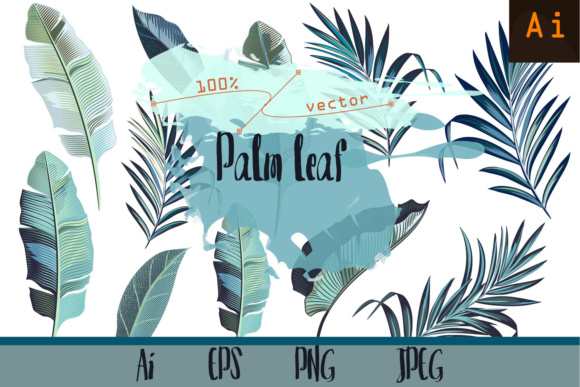
Palm Leafs. Vector ClipArt Set: A Versatile Toolkit for Designers and Creatives
Whether you’re crafting a tropical-themed wedding invitation, designing a bold textile print, or building a lush botanical pattern for digital branding—Palm Leafs. Vector ClipArt Set delivers precision, flexibility, and unmistakable visual warmth. This isn’t just another generic collection of leaf silhouettes. It’s a thoughtfully curated, hand-drawn set of 11 high-detail palm leaves—each one created from scratch on a graphics tablet, with deliberate attention to vein structure, curvature, texture, and organic rhythm.
Why Detail Matters in Vector Palm Leaves
Not all palm leaf vectors are built the same. Many clipart sets rely on simplified outlines or symmetrical repeats that feel flat and artificial. In contrast, the Palm Leafs. Vector ClipArt Set embraces botanical authenticity without sacrificing scalability. You’ll notice subtle asymmetries—the slight twist in a frond’s tip, the gentle taper of a petiole, the layered density where smaller leaflets cluster near the base. These aren’t decorative flourishes; they’re functional details that make your designs feel alive.
That realism translates directly into usability. When you scale a leaf up for a wall mural or down for a monogram detail on stationery, the vector paths hold their integrity. No pixelation. No loss of definition. Just clean, crisp lines and intelligent anchor placement—designed not just for viewing, but for editing, recoloring, layering, and combining.
What’s Inside the Palm Leafs. Vector ClipArt Set
The package is intentionally streamlined yet comprehensive—built for real-world production needs:
- 11 unique, high-detail palm leaf illustrations—no duplicates, no mirrored copies. Each is botanically inspired but stylized for design versatility.
- Multiple format options: AI (CS2+), EPS10, JPEG preview, one universal PNG with transparent background, and—critically—11 individual PNG files, each with its own alpha channel. This means drag-and-drop use in Canva, Procreate, Photoshop, Figma, or even PowerPoint without clipping masks or background cleanup.
- Production-ready organization: Files are named clearly (e.g., “PalmLeaf_07.ai”, “PalmLeaf_03_transparent.png”) and grouped logically—so you spend seconds, not minutes, finding the right variant.
No hidden layers. No locked objects. No surprise raster elements buried inside vector files. Everything is editable, scalable, and optimized for both print and digital output.
Real-World Uses That Go Beyond Decoration
Designers often reach for palm motifs when evoking relaxation, travel, or natural elegance—but the Palm Leafs. Vector ClipArt Set supports far more than mood-setting. Here’s how professionals actually use it:
Fabric & Surface Design
Textile designers use the individual leaves to build seamless repeats in Illustrator’s Pattern Maker—or manually tile them with rotation and offset for organic, non-grid-based layouts. Because each leaf has nuanced shape variation, patterns avoid the “cookie-cutter” fatigue common in mass-produced botanical prints. One designer recently used Leaf #4 and #9 to develop a linen duvet cover series for a boutique resort brand—blending realism with minimalist spacing.
Apparel & Merchandise
T-shirt printers love the transparent PNGs: drop a single frond onto a dark tee and adjust blend mode for subtlety, or group three leaves into a bold chest print. The vector files allow easy color separation for screen printing, while the EPS10 compatibility ensures RIP software reads paths correctly—even at large garment sizes.
Stationery & Paper Goods
From save-the-date cards to eco-conscious packaging, these leaves lend sophistication without clutter. Try placing Leaf #2 behind handwritten calligraphy as a soft watermark, or use Leaf #6’s long, slender form as a divider between sections on a menu or program. The transparency-ready files integrate cleanly into InDesign layouts, and the vector versions allow precise stroke adjustments for foil-stamping mockups.
Interior & Spatial Design
Architectural visualization studios embed the leaves into mood boards and 3D material libraries. A hospitality designer recently applied Leaf #10 as a subtle embossed motif on vinyl wallcovering for a Miami Beach lounge—scaling it to 300% and reducing opacity to 8% for tactile depth without visual noise.
Workflow Advantages You’ll Feel Immediately
This isn’t just about having assets—it’s about removing friction. Consider how the Palm Leafs. Vector ClipArt Set fits into modern creative pipelines:
- No tracing required: Skip the time-consuming step of converting scanned sketches or photos into vectors. These are production-ready from download.
- Consistent style across projects: Whether you’re designing a full brand system or a one-off social post, the cohesive line weight, proportion, and detail level ensure visual harmony.
- Adaptable to trends: Want a retro 70s vibe? Apply warm duotones. Going for Scandinavian minimalism? Reduce stroke width and simplify fill colors. The vectors respond intuitively.
- Accessible across skill levels: Beginners can use the PNGs instantly. Advanced users can ungroup, recolor, recombine, or export paths as SVG for web animation.
Choosing the Right Palm Leaf Assets—What to Watch For
Before downloading any botanical clipart, ask yourself three questions—and see how the Palm Leafs. Vector ClipArt Set answers each:
- Is it truly editable? Some “vector” files are merely embedded rasters or flattened groups. Here, every leaf is built with open paths, ungrouped layers, and no appearance effects—so you control every curve and corner.
- Does it scale without compromise? Test at 200% and 5%. If edges blur or anchor points distort, the file wasn’t built for real use. These leaves retain fidelity from business card size to billboard scale.
- Can I mix and match confidently? Generic sets often clash in proportion or weight. These 11 leaves were drawn as a family—same baseline stroke logic, consistent negative space ratios, and intentional variety in silhouette width and length.
It’s also worth noting: this set avoids overused tropes like cartoonish coconuts or clichéd tiki icons. It focuses solely on the leaf—clean, confident, and quietly expressive.
Where This Set Fits in Today’s Creative Landscape
In an era of AI-generated assets and infinite stock libraries, hand-drawn, human-crafted vectors stand out—not as nostalgia, but as intentionality. Clients notice the difference between algorithmic symmetry and thoughtful imperfection. Brands seeking authenticity, sustainability messaging, or artisanal positioning increasingly prioritize assets with clear authorship and tactile sensibility.
The Palm Leafs. Vector ClipArt Set reflects that shift. It’s not “filler” art. It’s a foundational element—a starting point for pattern, texture, rhythm, and narrative. Whether you’re illustrating a climate report with botanical metaphors, launching a wellness app with nature-infused UI icons, or developing a luxury skincare line rooted in tropical botanicals, these leaves provide grounded, elegant, and infinitely adaptable visual language.
And because it includes both vector and transparent raster formats, there’s no bottleneck between ideation and execution. Sketch in Procreate using the PNGs, refine layout in Figma, finalize in Illustrator—and move seamlessly into print prep or developer handoff.
Final Thought: Quality That Scales With Your Ambition
You don’t need 100 palm leaves to do meaningful work—you need 11 exceptional ones. The Palm Leafs. Vector ClipArt Set proves that depth beats volume, intention beats automation, and craftsmanship scales further than shortcuts ever could. It’s designed for the designer who values control, clarity, and quiet confidence in every line.
When your next project calls for organic energy, structural elegance, or simply the unmistakable grace of a palm frond—this set doesn’t just meet the brief. It elevates it.