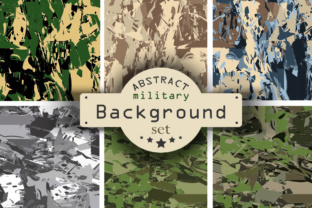
6 Camouflage Backgrounds Collection: Practical Integration for Designers, Marketers, and Content Creators
The 6 Camouflage Backgrounds Collection is a tightly curated set of vector-based camouflage patterns designed for precision, flexibility, and real-world application. It’s not just decorative texture—it’s a production-ready asset that slots into workflows where consistency, scalability, and format reliability matter. Whether you’re preparing a product mockup, building a brand presentation, designing merch prototypes, or developing educational materials with tactical or outdoor themes, this collection delivers six distinct patterns—each optimized for editing, layering, and output—without compromise on resolution or structure.
How It Fits Into Your Workflow—Before, During, and After Creation
Unlike generic stock textures, the 6 Camouflage Backgrounds Collection supports intentional planning from the earliest stages. Before starting a project, designers use the included .ai and .eps10 files to test pattern behavior at different scales, check color fidelity across devices, and confirm compatibility with existing brand palettes. The vector nature means no pixelation when resizing for large-format prints—critical if you’re prepping trade show banners, apparel layouts, or packaging dielines.
During execution, the layered .psd file becomes a workflow accelerator. Each background lives on its own layer, allowing non-destructive toggling, blending mode experiments, mask applications, and quick A/B comparisons—no need to re-import or reposition. This saves time when iterating for client feedback or aligning with team members who prefer Photoshop over Illustrator. For example, a marketing manager building a seasonal campaign around rugged gear can rapidly swap patterns to match tone (e.g., muted woodland for authenticity vs. high-contrast digital camo for tech-forward messaging) without restarting the composition.
After finalization, the six .jpg files—4000×4000 px at 300 dpi—serve as ready-to-deploy assets for print vendors, web CMS uploads, or social media ads requiring crisp, high-res backgrounds. They eliminate last-minute export errors caused by mismatched color profiles or unintended resampling. Because each JPG is generated from the same vector source, color and proportion remain consistent across all six variants—a subtle but essential detail for maintaining visual coherence in multi-pattern projects like lookbooks or swatch libraries.
Integration With Tools, Platforms, and Team Processes
This collection works natively within Adobe Creative Cloud ecosystems, but its value extends beyond software boundaries. When paired with Figma or Sketch via SVG export (easily derived from the .ai file), it supports collaborative design handoffs where developers need scalable, lightweight assets for responsive interfaces. For educators creating field-training modules or military history presentations, the PSD layers allow easy annotation—adding labels, arrows, or callouts directly onto specific camouflage types without flattening or losing editability.
Small business owners using Canva or PowerPoint benefit indirectly: the high-res JPGs paste cleanly, retain sharpness at common slide dimensions, and avoid watermarking or licensing friction common with free alternatives. Freelancers bundling deliverables for clients appreciate having both editable vectors (.ai, .eps) and flattened, print-ready JPGs in one package—reducing back-and-forth over file formats and speeding up approval cycles.
Compatibility isn’t assumed—it’s verified. The .ai file is saved in Illustrator CS6+ format, ensuring broad backward support without requiring the latest subscription version. The .psd uses standard layer naming and no smart objects or linked files, so it opens reliably across Photoshop versions and avoids missing font or plugin dependencies. That kind of forward-thinking file hygiene matters when handing off to printers, agencies, or cross-functional teams with varying software setups.
Practical Implementation Tips for Real Projects
- Start with purpose, not pattern. Identify your use case first—e.g., “background for a firearms safety course PDF” or “texture overlay on a hiking apparel e-commerce banner.” Then choose the camouflage variant that matches context: digital camo for tech-related content, desert tan for arid-region branding, or forest green for conservation messaging.
- Leverage layers before flattening. In the PSD, rename layers meaningfully (e.g., “Woodland_Camo_BG_Layer”) and group them under a master folder labeled with your project name. This maintains clarity during revisions and makes future reuse faster.
- Test contrast early. Camouflage patterns can reduce text legibility. Use the vector files to apply white or black overlays (at 10–20% opacity) or adjust brightness/contrast non-destructively—especially important for accessibility compliance in public-facing materials.
- Batch-export for consistency. If you need additional sizes (e.g., 1920×1080 for video thumbnails), generate them from the vector source—not the JPGs—to preserve edge clarity and avoid interpolation artifacts.
- Archive with metadata. Save a copy of the original ZIP with a dated folder name and brief README noting which pattern was used where (e.g., “Desert_Camo_JPG used in Q3 Product Launch Deck, Slide 7”). This builds institutional memory and simplifies audits or repurposing later.
Long-Term Usability and Quality Control
Vector-based camouflage doesn’t degrade. Unlike raster-only packs, the 6 Camouflage Backgrounds Collection retains fidelity whether scaled to fit a business card or a billboard. That longevity translates to cost efficiency—no need to repurchase updated versions for new output requirements. And because all six patterns share the same construction logic (consistent line weights, repeat units, and spacing), mixing them within a single brand system feels intentional, not haphazard.
Quality control starts with how the files are structured—not just what they contain. The absence of embedded fonts, external links, or proprietary effects means fewer points of failure during handoff. The 300 dpi JPGs meet commercial printing standards out of the box, while the vector files support Pantone matching and spot-color separation when needed for branded merchandise.
For educators and trainers, the collection supports modular learning. One pattern can illustrate concealment principles in biology class; another demonstrates material science concepts like infrared reflectivity in engineering curricula. Because the assets are self-contained and license-clear, they integrate seamlessly into LMS platforms, printed workbooks, or interactive simulations—no attribution overhead or usage restrictions.
When to Reach for This Collection—And When Not To
Reach for the 6 Camouflage Backgrounds Collection when you need predictable, professional-grade camouflage textures that behave consistently across editing environments and output channels. It excels in scenarios demanding scalability, collaboration, and repeatability—like agency pitch decks, product development sprints, or standardized training materials.
It’s less suited for experimental generative art or highly stylized illustrations where distortion, grain, or painterly variation is part of the aesthetic. Those needs are better served by hand-painted textures or procedural tools. But for grounded, functional design—where clarity, control, and compatibility lead—the collection delivers exactly what’s promised: six reliable, well-organized, production-ready camouflage backgrounds, built to last and built to work.